Abandoned Carts Overview
Abandoned cart recovery sends a 3-touch WhatsApp sequence to customers who leave items in their cart without completing checkout.
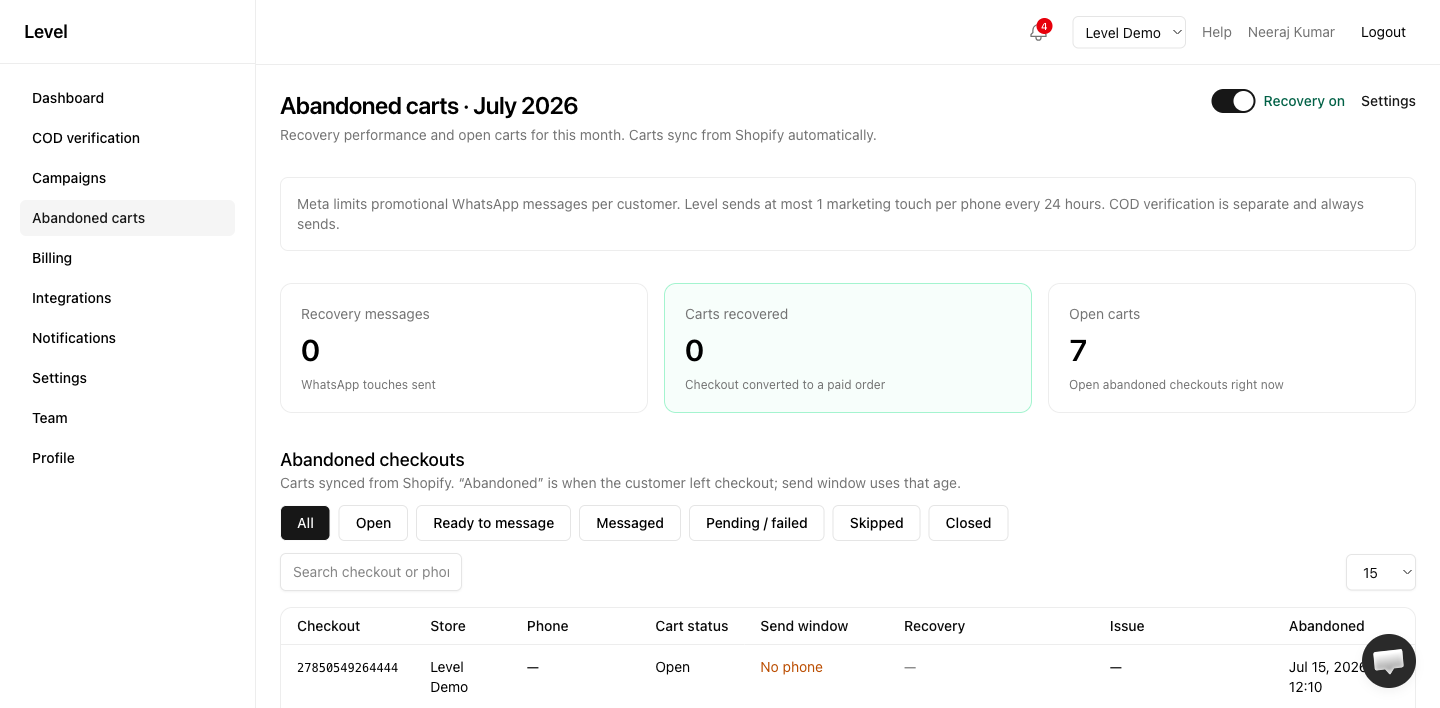
How it works
- Sync — Level checks Shopify for abandoned checkouts every few minutes
- Qualify — Carts with a phone number and a checkout link enter the send queue
- Message — Up to 3 WhatsApp messages, spaced out over hours you control
- Recover — When the customer completes checkout, the cart is marked recovered
Plan requirement
Abandoned cart recovery requires Starter, Pro, or Agency. Free plan merchants see the feature as locked.
Master toggle
Recovery on/off in Abandoned cart settings . When off, carts are still tracked but no messages are sent.
The 3-touch sequence
| Touch | Default timing | Message type |
|---|---|---|
| 1 | 1 hour after abandon | Reminder (no discount) |
| 2 | 24 hours after touch 1 | Nudge or discount offer |
| 3 | 48 hours after touch 1 | Final reminder |
See 3-touch sequence for details.
Dashboard metrics
The Abandoned carts page shows:
- Recovery rate — % of messaged carts recovered this month
- Open carts — Carts still eligible
- Recovery messages sent — Total touches delivered
- Carts recovered — Checkouts completed after messaging
Setup checklist
- Upgrade to Starter or Pro
- Assign templates for abandoned cart message types
- Enable recovery in settings
- Create a Shopify discount code if using discount offers
Related
Need help for abandoned carts?
- — live chat on this page
- Contact form — email the Level team
- Open Level app — in-app Help button for account-specific issues
- Troubleshooting guides
Last updated on